Does x86-64-v3 Really Matter? Benchmarking Standard Arch Linux vs a Fully Optimized CachyOS Stack
Introduction
x86 architecture has evolved through many variants: x86_64-v1, x86_64-v2, x86_64-v3, and now v4 with Zen 5. The mainline Linux kernel targets the oldest v1 instruction set so it can run on everything from a 20-year-old laptop to modern workstations, supercomputers, servers, and IoTs. That means it uses only the instructions every CPU has in common.
But on modern workstations and personal computers we want the performance and efficiency of those newer instruction sets. The advantage is real — roughly 20% to 40% performance gain at the same power draw. You won’t see a huge difference on an i9 or Ryzen 9, but it’s a game changer for lower-end systems.
I am also going to benchmark the userland software stack of CachyOS, whose repo ships v3-optimized binaries compiled for the newer instruction sets.
Comparison Table for Architecture
| Feature | x86-64-v1 | x86-64-v2 | x86-64-v3 |
|---|---|---|---|
| SSE2 | ✅ | ✅ | ✅ |
| SSE4.2 | ❌ | ✅ | ✅ |
| AVX | ❌ | ❌ | ✅ |
| AVX2 | ❌ | ❌ | ✅ |
| FMA | ❌ | ❌ | ✅ |
| BMI1/BMI2 | ❌ | ❌ | ✅ |
| AVX-512 | ❌ | ❌ | ❌ |
| SHA Extensions | ❌ | ❌ | CPU Dependent |
| Compiler Scheduling | Generic | Generic | Generic |
| Hardware Compatibility | Highest | Very High | Modern CPUs |
| Performance Potential | Lowest | Medium | High |
| _____________________ |
Test System
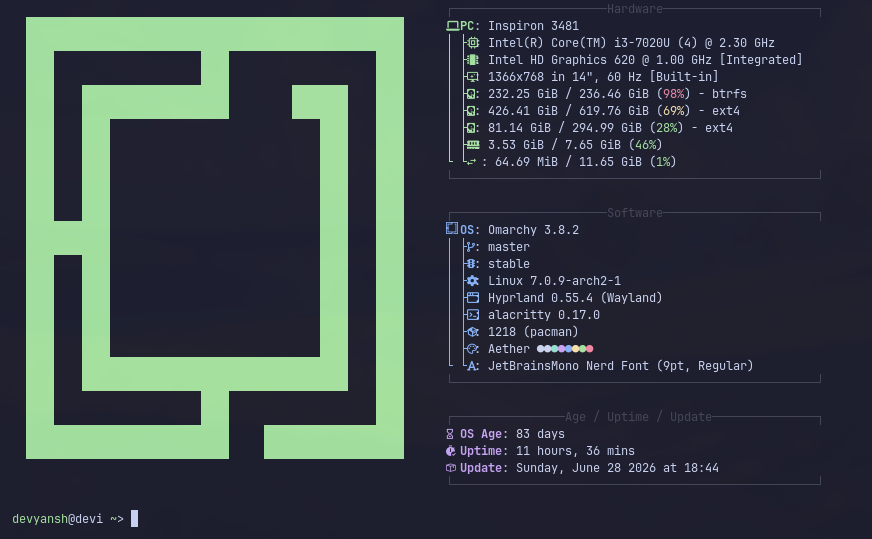
My test system is an i3-7020U laptop. Testing on higher-end hardware would show improvements too, but I don’t have that on hand. For the OS I am using base Arch with Omarchy. I will swap kernels and program instruction sets while keeping the hardware identical across every benchmark. Below is a fastfetch screenshot of the specs.
Kernels
- Standard Arch Linux kernel (mainline) The standard kernel across most Linux systems. It uses CFS (Completely Fair Scheduler), is stable, and has a tick rate of 250Hz by default.
- Optimized CachyOS Linux kernel
The CachyOS kernel targets the v3 instruction set and uses EEVDF (Earliest Eligible Virtual Deadline First) or BORE (Burst-Oriented Response Enhancer), tuned for throughput and minimal latency with an aggressive tick rate of 1000Hz versus mainline’s 250Hz. Despite being efficient, the aggressive tick rate reduces laptop battery life by about 3–5%.
For this benchmark I am using
linux-cachyos-bore. I will compare EEVDF vs BORE in another blog.
Installation of Repos and Kernel
To use the repos and the CachyOS kernel we need to add the repo source to base Arch Linux, or you can just download the stock image from the CachyOS website.
curl https://mirror.cachyos.org/cachyos-repo.tar.xz -o cachyos-repo.tar.xz
tar xvf cachyos-repo.tar.xz
cd cachyos-repo
sudo ./cachyos-repo.sh
sudo pacman -Sy linux-cachyos linux-cachyos-headers
Or head to the documentation here.
Benchmark Methodology
Every benchmark was
- repeated three times
- averaged
- rebooted before testing
- run with performance governor enabled
- run with background services disabled
Benchmark
The biggest advantage of the v3 Linux kernel and the CachyOS v3 repo shows in CPU-heavy tasks that use intense calculations — compression and compiling C projects like the Linux kernel and llama.cpp. These benefit noticeably and are faster and more efficient on the CPU with v3-compiled binaries.
Boot Time
I divided boot time into two parts: kernel loads boot menu to login screen, and from login screen to full desktop. The kernel’s benefit is heaviest in the second part — from boot loader to desktop.
![[boot time]](/assets/v3-bench/boot-time.svg)
C Library Compiling
I only compiled one project, llama.cpp — kernel compilation was taking too long and kept crashing.
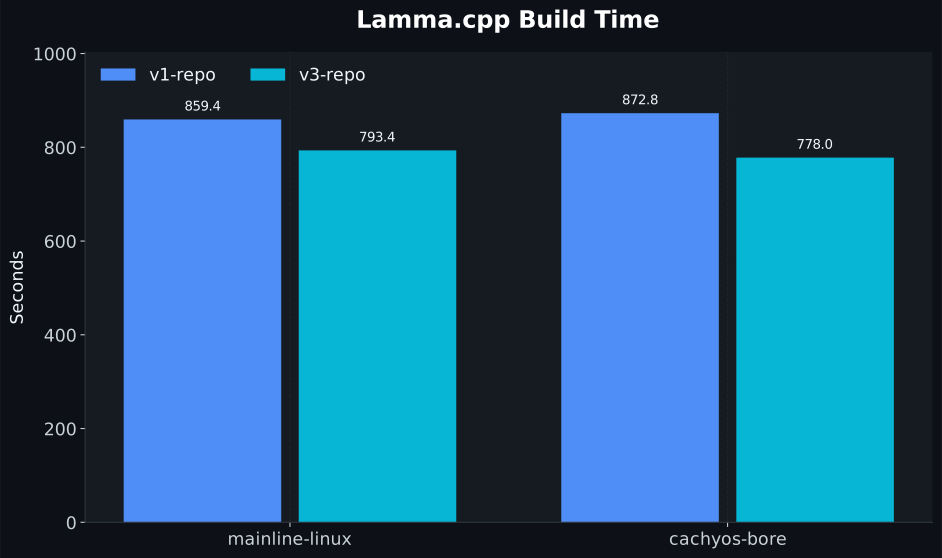 Surprisingly, the CachyOS Linux v3-optimized repo was slower, and v1 with the optimized kernel was faster when compiled with cmake. This is an area where it didn’t perform, but the kernel was faster with the base repo.
Gen-AI on CPU Benchmark
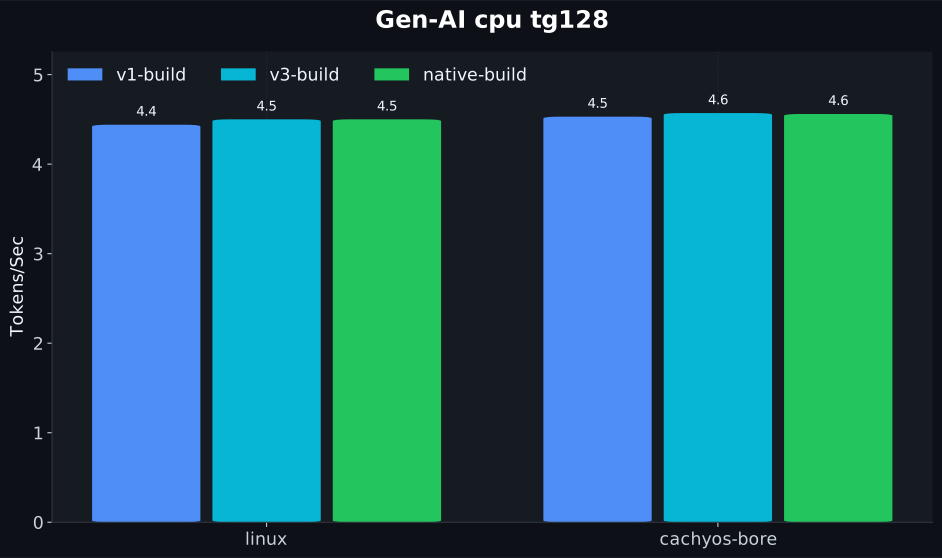
The kernel doesn’t help much here because it’s constrained by RAM bandwidth. Still, v3-optimized vector instructions are faster when RAM isn’t the bottleneck. I used llama.cpp with different builds for comparison:
- base build: base v1 instruction set (universal)
- v3 build: v3 instruction set
- native build: built for the current CPU, using the best instruction set
The model used is gemma-4-E4B-Gemini-3.1-Pro-Reasoning-Distill-Q3_K_M.gguf.
Prompt Processing 2 (pp2)
token generation 128 (tg128)
![pp2][/assets/v3-bench/llama-ai-pp2.svg]
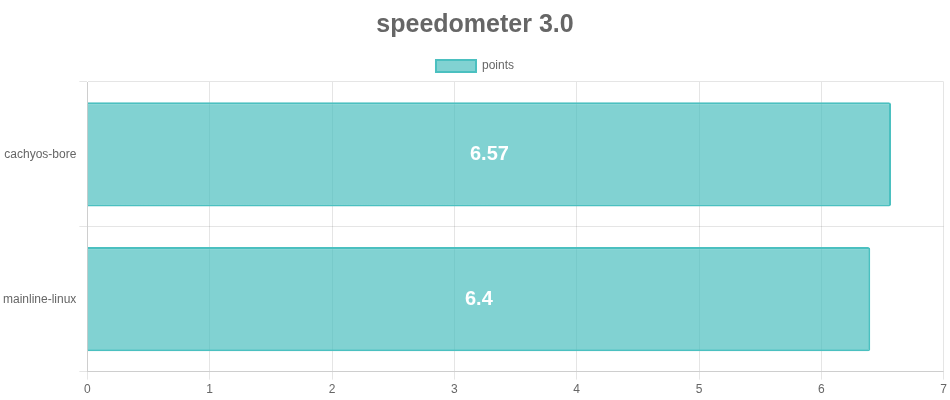
Browser Speedometer 3.0
Speedometer is a web browser benchmark that rates responsiveness and page loading. The throughput- and responsiveness-focused CachyOS kernel is dominant here — clearly the winner.
Compression Benchmark
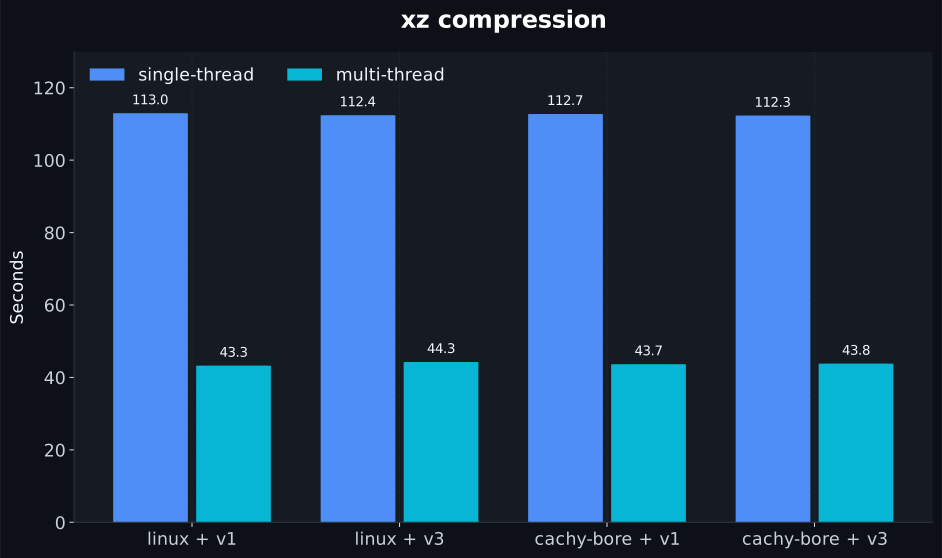
This test is fully CPU-dependent — the faster the calculation, the faster the compression. I benchmarked xz, zstd, and 7z using a 200 MiB text file.
XZ Compression
I was surprised CachyOS is not dominant here. This program is very CPU- and calculation-heavy, but it’s memory-bound, which is why it doesn’t shine here.
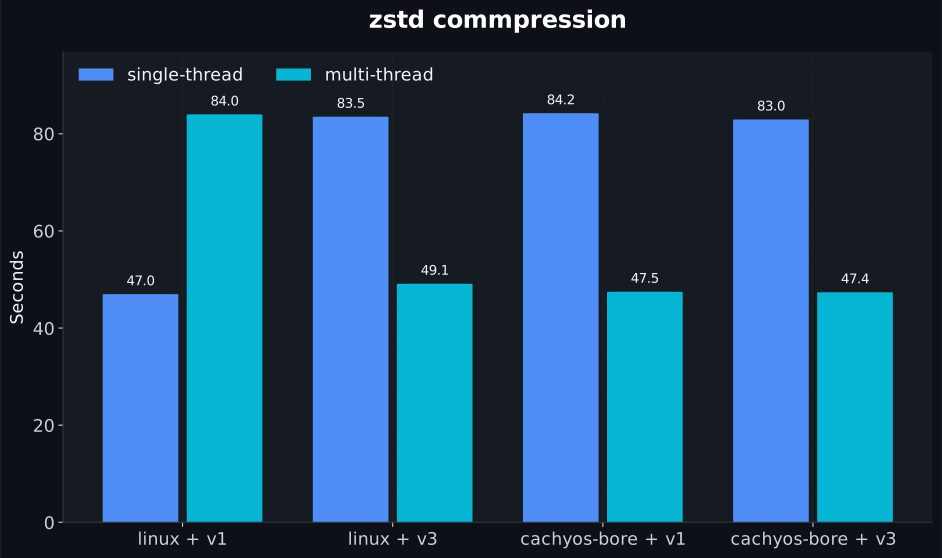
Zstd Compression
Another compression test — the overall performance of kernels and repos is pretty consistent here.
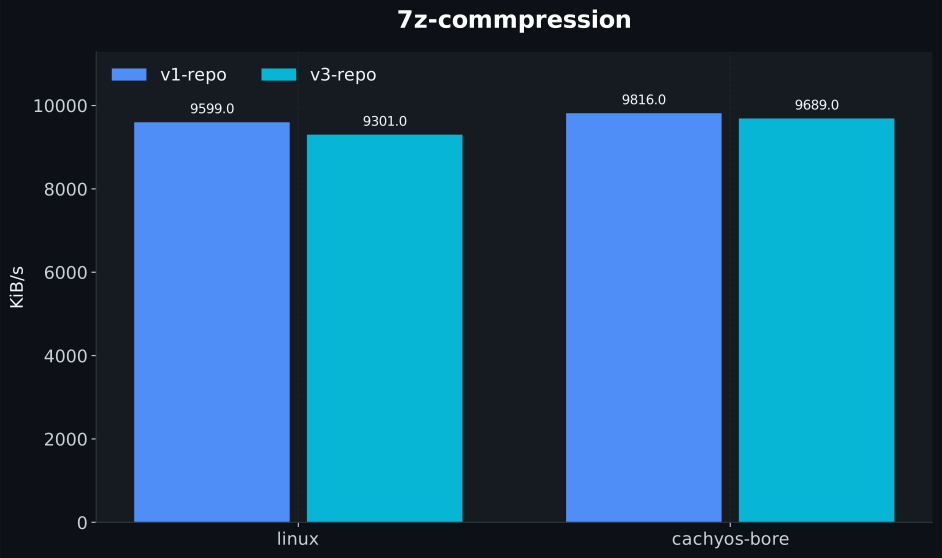
7z Inbuilt Benchmark
Here CachyOS is dominant and performs a little better.
7z Compression
 7z decompression
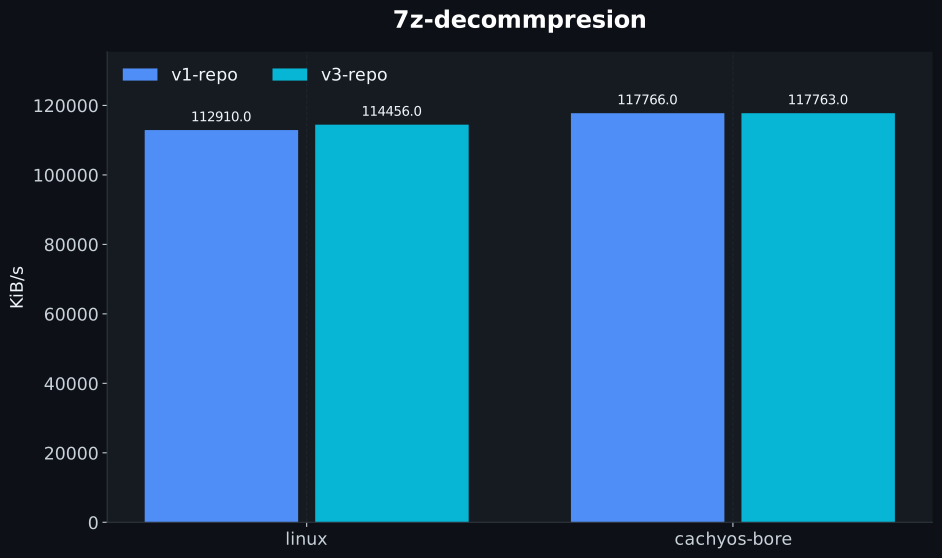
Multimedia
For multimedia processing I encoded videos using ffmpeg on the CPU. I didn’t use the GPU because then the CPU and kernel scheduler wouldn’t affect the benchmark as much.
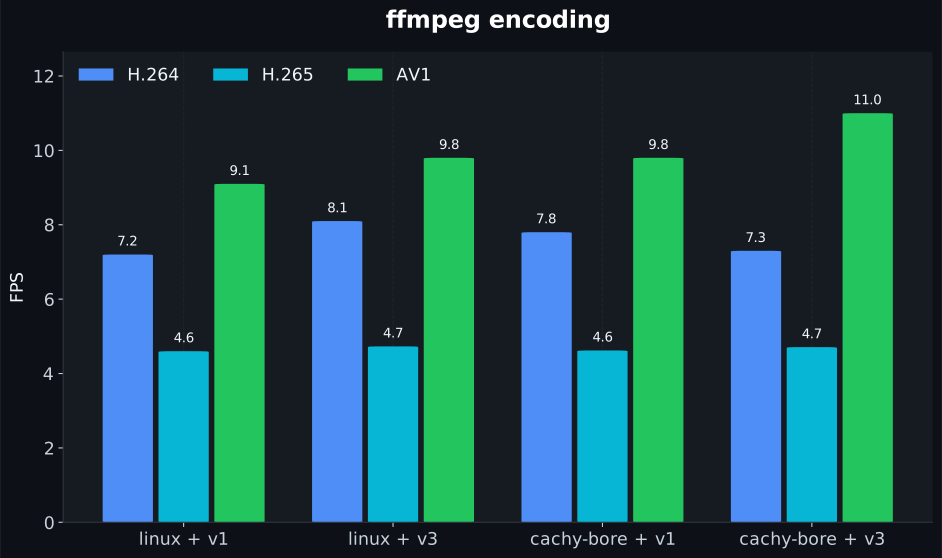 As expected, CachyOS is dominant here thanks to its BORE scheduler and robust performance.
Cryptography Comparison
This workload needs heavy computation, and AVX/AVX2 (Advanced Vector Extensions) help since vectorized instructions are faster.
SHA256
I compared encryption speed of 256-byte and 16384-byte blocks via openssl speed sha256.
.svg) The v1 build is faster, but again the CachyOS kernel is dominant.
The v1 build is faster, but again the CachyOS kernel is dominant.
SHA512
Same as SHA256 but more consistent.

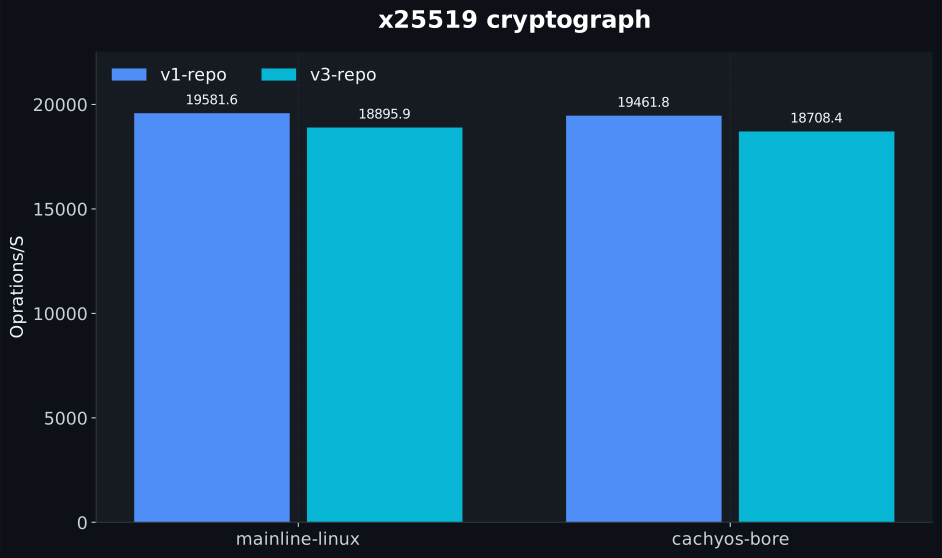
X25519
Mainline Linux is a little dominant here.
RSA4096
This is a CPU-heavy asymmetric cryptographic algorithm. The parameters cover keygen, encryption, signing, etc.
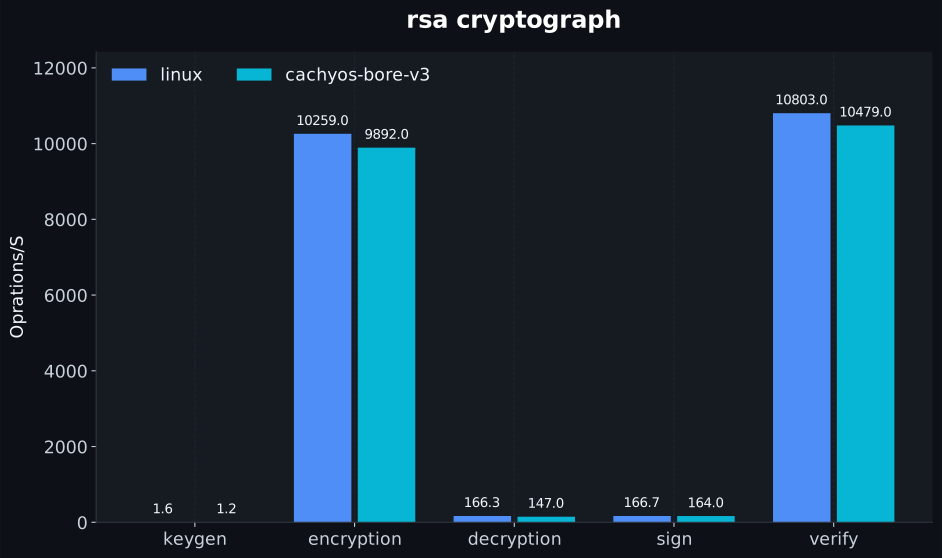
Gaming (Genshin Impact)
The best benchmark for checking system responsiveness and throughput.
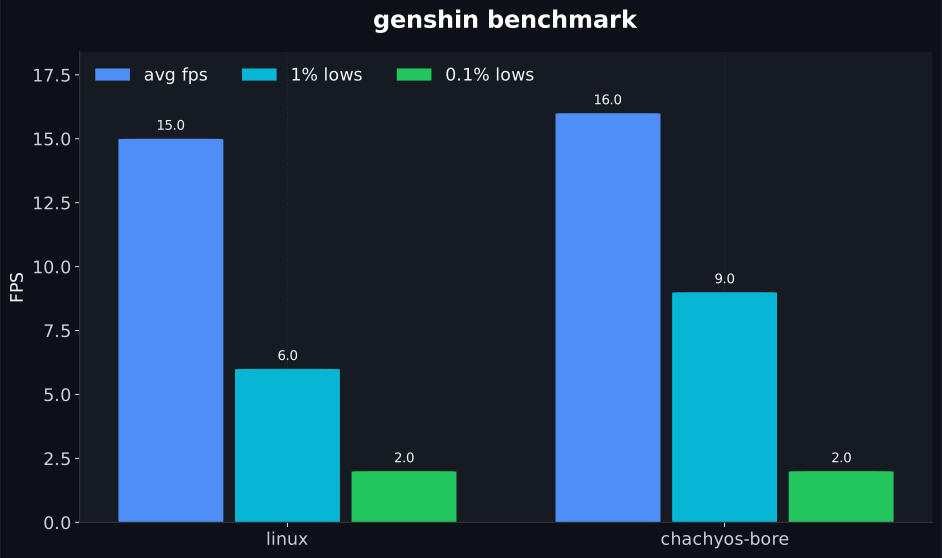 The higher 1% lows on CachyOS show it is a performance-tuned kernel, specifically for this task. Though the hardware isn’t really capable of running this game, I managed low-to-medium settings — it’s what I have.
Conclusion
The system performed better in most areas but sometimes fell behind mainline Linux. That is likely because the machine is old and there may be hardware quirks between the CPU and DRAM. Still, the CachyOS kernel and its repos are aggressively tuned to give the best throughput and performance on bleeding-edge releases, while the mainline kernel and repos prioritize stability and a rolling release model.
What to Pick
If your workflow is like mine — terminal-focused, mostly TUIs, stable — you don’t need CachyOS. Mainline Linux is still very good and much faster than any alternative OS.
CachyOS is for those who prioritize throughput and performance from their hardware: gamers and multitaskers who want a noticeable difference from their Linux distro.
My Personal Opinion (and What I Use)
I use both — I choose between Linux and CachyOS at the boot menu. The difference is noticeable. The GUI is more responsive, apps feel faster — the scheduler prioritizes micro-execution of programs, and when i do devloper workflow i use the mainlinux and when i game or heavy multitasking i chose cachyos-linux-bore kernel
Results Summary
| Benchmark | Winner | Notes |
|---|---|---|
| Boot Time | Mainline / CachyOS | Kernel benefit is in second phase (loader → desktop) |
| Compilation (llama.cpp) | Mainline kernel + v1 | CachyOS v3 repo was unexpectedly slower |
| Gen-AI (llama.cpp) | CachyOS (v3/native) | RAM bandwidth is the bottleneck, but v3 vector helps |
| Speedometer 3.0 | CachyOS | Clear win on responsiveness and throughput |
| XZ Compression | Mainline | Memory-bound; CachyOS didn’t help |
| Zstd Compression | Tie | Consistent across kernels and repos |
| 7z Benchmark | CachyOS | Slightly better |
| FFmpeg Encoding | CachyOS | BORE scheduler advantage |
| SHA256 | CachyOS kernel (v1 build faster) | Kernel scheduler dominant |
| SHA512 | CachyOS kernel | Consistent lead |
| X25519 | Mainline Linux | Slightly dominant |
| RSA4096 | CachyOS | Better throughput |
| Gaming (Genshin Impact) | CachyOS | Higher 1% lows, smoother experience |
Comments